


Data Collection App
Enable accurate, secure, and fast field data collection without complication.
Capture every inspection, photo, and signature in seconds, then access them instantly from anywhere.
Industry leaders trust TrueContext for faster, safer, smarter field service.




Improve job quality and team efficiency in the field
Collect clear information where and when work happens, and keep every part of your operation running smoothly.
- Zero guesswork, fewer return visits: Technicians follow guided steps and attach photos or bar-code scans on-site to avoid missing details.
- Data that leaders can trust: Real-time validation and automatic syncing mean numbers match reality. Review metrics, spot trends early, and focus on progress instead of data clean-up.
- Audit-ready documentation: Each job produces a tidy record of signatures, timestamps, and media files.
With dependable field data at the first touchpoint, you reduce costly rework while keeping every stakeholder on the same page.
How field technicians collect accurate data on-site with TrueContext

Mobile forms built for field service
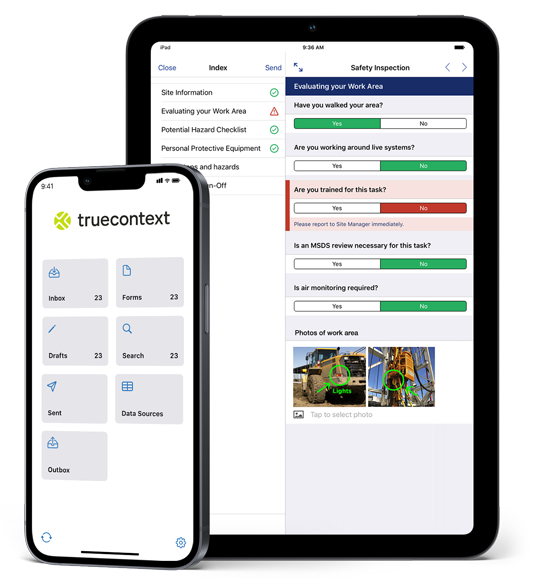
With TrueContext’s mobile forms app, technicians open pre-loaded workflows for maintenance, inspections, or repairs on their phones or tablets. Forms tap into native features like GPS, date-time stamps, and one-touch signatures.

Visual & media-based inputs
Your data collection app lets crews snap photos of asset damage, annotate those images, and even record short videos if needed. Built-in barcode and QR scanning instantly confirms equipment IDs, adding visual proof and context to each job record.

Hands-free & offline access
Technicians use voice-to-text to take notes while keeping their hands free for the job. If they’re out of range, the app saves everything locally and syncs automatically when the connection comes back. Checklists guide them through safety and compliance steps to make sure nothing is overlooked.

Conditional logic forms
Keep every report accurate from the start. Smart branching logic adapts questions to the task, asset type, or site, prompting only for the data that matters. Required fields and real-time validation prevent omissions, while customizable workflows let you fine-tune forms for each region or team.
Give field leads real-time oversight
Captured data flows to the office the moment a form is closed, giving supervisors live visibility into every job.
- Instant status updates: View submitted work orders as they arrive and spot delays before they snowball.
- Thoughtful follow-ups: Built-in logic can trigger a second task, parts order, or safety inspection automatically.
- Actionable dashboards: Track first-time fix, inspection counts, and other KPIs from one screen, no spreadsheet merges required.

Automate tasks with collected field data
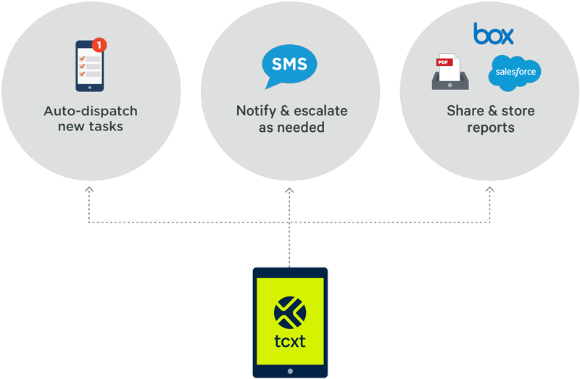
One submission in your data collection app sets everything else into motion:
- Close a work order and push results to your FSM or field service software.
- Sync asset readings to your CRM, EAM, or ERP with no re-keying.
- Send a signed PDF to the customer and compliance team in seconds, keeping everyone informed and audit-ready.
Designed for the field, trusted by the enterprise
TrueContext balances technician ease with enterprise safeguards:
- Role-based access keeps sensitive data visible only to the right people.
- Reporting and analytics turn raw entries into trends that leadership can act on.
- Enterprise-grade security meets SOC 2, HIPAA, and other compliance requirements.
Leverage out-of-the-box integrations to consolidate field and office data
Pre-built connectors and open APIs pull field insights into back-office systems and push job details back to crews, keeping everyone on the same page and reducing manual entry.Connect your data collection app to the tools you already use. Discover integrations to Salesforce, ServiceNow, SAP, and more.
Connect your data collection app to the tools you already use. Discover integrations to Salesforce, ServiceNow, SAP, and more.




Case Studies
Results from the field
Johnson Controls empowers 7,000+ technicians
Johnson Controls (JCI), a global HVAC company, sought a solution to achieve digital transformation, empower technicians of all experience levels to perform complex tasks, and generate customer-facing documents confirming services.
JCI identified TrueContext as a robust yet agile platform that had the enterprise capabilities and flexibility they required.
Results:
- Reduced asset downtime.
- Increased customer satisfaction.
- Achieved digital transformation for 7,000+ active users across North America.
“In the past, if I had to deploy an app without that flexible technology, it would take months and a minimum of $300,000.”
— Buddy Saucier, VP, HVAC Services at Johnson Controls
How different industries use the TrueContext data collection app

Field Service
Technicians launch work orders from their phones, capture parts used and customer signatures, then sync results straight into a FSM or CRM.
Dispatch can reroute specialized help instantly because status updates are posted in real time.

Oil & Gas
Remote wells and pipelines often sit well beyond cell coverage.
Crews open the data collection app offline, walk through guided safety checks, attach geotagged photos of equipment, and let the forms sync automatically when they regain signal.
Supervisors back in town see the full inspection (complete with timestamps) without waiting for paperwork to arrive.

Industrial Equipment
Large plants juggle dozens of concurrent audits.
Digital checklists standardize each step, while barcode scans confirm every asset is inspected.
Site leads compare results across facilities in a single dashboard and quickly schedule follow-ups.

Medical Equipment
Field engineers calibrate sensitive devices in hospitals and labs.
Mobile forms prompt users for serial numbers, calibration values, and photo evidence, ensuring each unit meets regulations before the tech leaves the site.
Same-day reports flow to quality teams and regulators without extra administrative work.
Frequently Asked Questions
What is a field data collection app?
How to collect data during field work?
Does TrueContext integrate with my FSM, CRM, EAM, etc.?
Can workflows be customized for different field service tasks or teams?
How does the app support data capture in low- or no-connectivity environments?
Still have questions?
Book a 15-minute chat to learn how you can make TrueContext work for you.